

What your team puts in
- Meetings. Record any call you’re on from the desktop app, without a bot joining: the audio comes from your own machine, so Google Meet, Teams, Zoom, Slack and anything else you call from all work the same way. Jinn writes out who said what. See recording a meeting. Already have the call as a file — a Zoom export, a voice memo, a video? Upload it from the browser and Jinn reads it the same way. See uploading a recording.
- Docs. Write the spec, the plan or the notes from the call in the same project, in an editor your team works in together. Jinn keeps versions as you go, so an afternoon’s work is never one bad paste away from gone. See writing a doc.
Coming soon. What your customers report. Put one snippet on your site and visitors report bugs, ideas
and questions without signing up — a marked-up screenshot, a recording of their screen and
voice, the technical details attached. Each report lands in the project it belongs to, next to
the meetings and docs it’s about. See customer feedback.
Who reads it
An agent is a role you describe once: a product manager, a QA engineer, a team lead, a recruiter, a salesperson, or one you write yourself. Put it on a project and it reads every recording there the way a person in that job would. A product manager watches for decisions and open questions, a QA engineer for acceptance conditions, and the same forty minutes give each of them something different. See agents. What an agent writes about a meeting is a summary, the key points, and the action items somebody took on.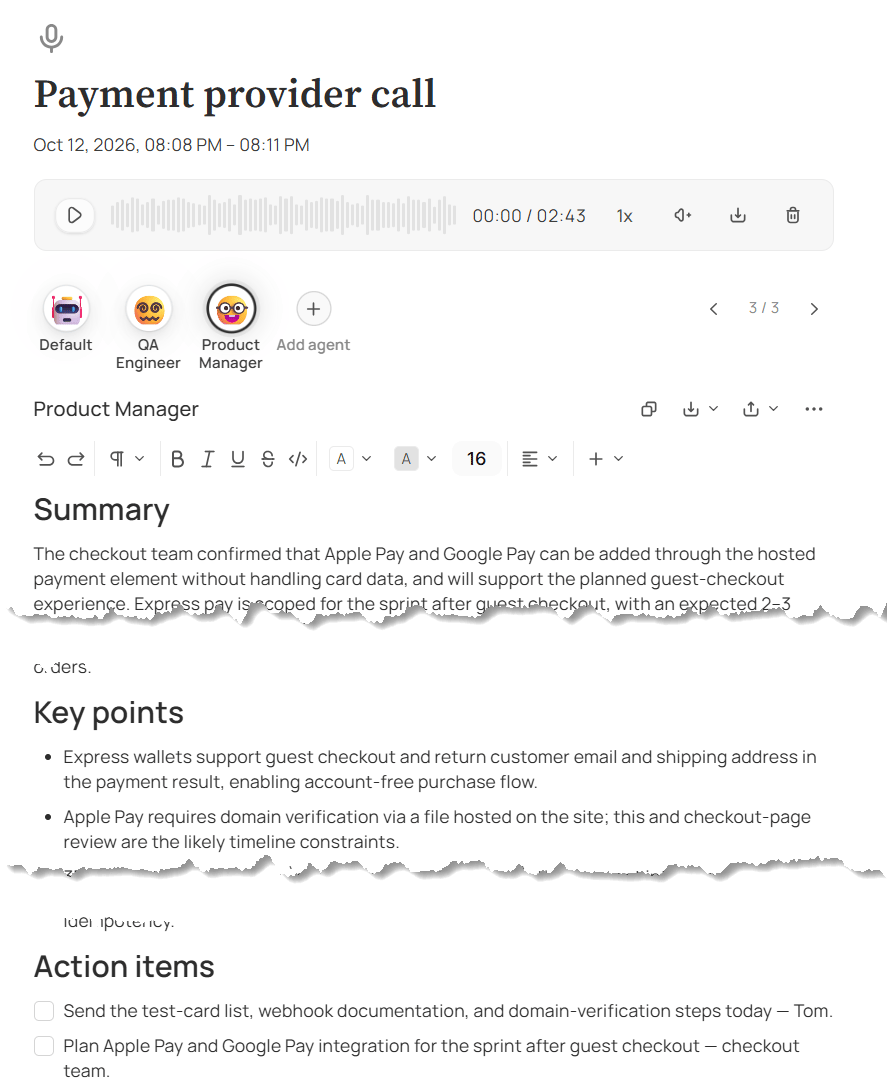
What a meeting comes back as
How you get it back
Ask a question in plain words — what did we decide about pricing, who owns the launch — and choose what Jinn looks through: one recording, one doc, a project, or the whole workspace. Jinn answers from your team’s own meetings and docs. Every answer lists what it drew on, so you can check it in a click, and when nothing in your workspace matches, the chat says it found nothing instead of guessing. Bring an agent into the chat and it answers the way that role would. See asking about your work. Search finds a passage by what was said rather than by the exact words, so a search for pricing turns up the meeting where nobody said the word. Tag the moments you’ll want back and they’re one click away afterwards. The payoff isn’t the summary you read today. It’s the conversation you get back next quarter when somebody asks why. Every step, from pressing record to finding the meeting again months later, is in How Jinn works.Who Jinn suits
Jinn is for teams where the plan changes faster than anyone writes it down. The more of your work is spoken rather than written, the more there is for Jinn to do.- Product and engineering teams — discovery, planning and reviews, where a decision made on a call becomes a ticket somebody else has to write
- Outsourcing and agency teams — client calls where what was asked for on Tuesday is the scope conversation on Friday, with a different client behind every project
- Sales and customer teams — demos, discovery and renewals, where the objection someone raised matters more than the call it was raised on
- Support teams — customer problems that should reach the product team in one piece, without being retold twice
- HR and recruitment teams — interview after interview, where every candidate’s strengths and concerns need writing down and the whole hiring round belongs in one place
- Accountants and legal offices — a project per client, with every call, doc and agreed next step kept where only the right people can open it
- Founders and leadership — investor, hiring and partner conversations nobody has time to write up and everybody refers back to
Who can see your work
Everything in Jinn lives in a project, and the project decides who sees it.- A private project is visible only to the people added to it. An open project is there for everyone in the workspace.
- In each project, people have Full access, Can edit or Can view, and each level sees and does only what it should.
- Recordings, transcripts, write-ups and customer reports follow the access of the project they’re in. Search and chat find only what you can already open.
- Recording without a bot means nobody new joins the call. Telling the others you’re recording is your call to make.
- Transcribing and analysing send the content to an AI provider, and your workspace decides whose account they run on — Jinn’s own, or provider keys you control.
What you need before you start
- A workspace. Create one when you sign up, then add a project for each client, product or stream of work.
- The desktop app, to record calls. Jinn runs in the browser for everything else, but recording a call as it happens needs the desktop app, on macOS or Linux. Install it, turn meeting notes on in its settings, and on macOS allow it to record your screen and audio when the system asks.
- A few agents. Start from the ready-made roles, put them on your project, and they write their notes on the next recording. See agents.
- Your AI keys, if your workspace runs on its own. Add them in workspace settings; until a key is there, agents, chat and write-ups have nothing to run on. See How your AI is powered.
Where to go next
How Jinn works
Every step from pressing record to finding the meeting again months later.