

Only workspace owners and admins can open Settings → AI Providers or change anything
on it. Everyone else works on whatever the workspace is set to.
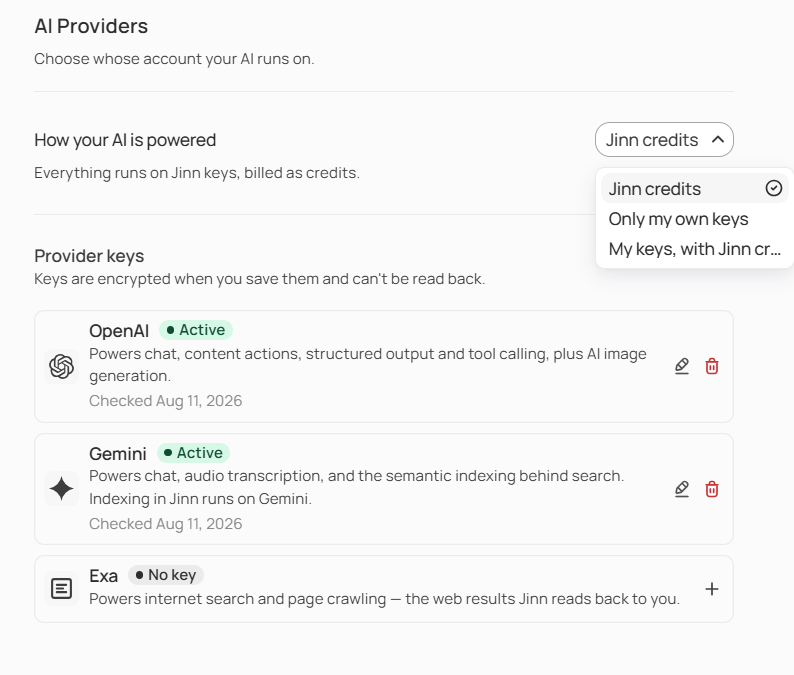
The AI Providers tab: the three modes, and a key per provider
Choose how your AI is powered
Three modes, and the difference between them is what happens when a key isn’t there.- Jinn credits — everything runs on Jinn’s own provider accounts. Nothing to set up, and nothing to keep alive.
- Only my own keys — each provider runs on a key you’ve added. A provider with no active key is unavailable, and Jinn refuses the call rather than quietly using something else. Choose this when it matters that your content only ever reaches accounts you control.
- My keys, with Jinn credits as backup — your keys go first, and Jinn credits cover any provider whose key is missing or switched off, so nothing stops working while you fix it.
What each provider does
Each one has a job:- Chat and reasoning, including the analysis agents produce
- Transcription — turning meeting audio into text
- Indexing — making your content findable by meaning
- Web search, for the parts of Jinn that read the internet
- Images, and applying AI-suggested edits
Key states, and what to do about each
Jinn switches a key off for one of three reasons, and each says what to do:
- Your provider kept rejecting it. Check it again to bring it back, or replace it.
- Your account with them can’t serve calls. Usually a balance. Top it up, then check the key again.
- Jinn can’t read the key any more. Paste it again.
What stops loudly, and what stops quietly
This is the part worth remembering. Chat and transcription fail loudly. If the key they need is gone, they say so. You get an error, or a failed transcription with Try again on it. Nothing is lost silently. Indexing stops quietly. If the workspace runs on its own keys and the key behind indexing isn’t usable, indexing does nothing at all — no error, no retry, no notification. New recordings and write-ups never become findable by meaning. So when something has disappeared from search, check this page first. It’s the most common cause and the one that gives you no other clue.What indexing does
Indexing reads your transcripts and write-ups and makes them findable by what they mean rather than by exact wording. It’s how a search for pricing finds the meeting where nobody said the word pricing. It runs by itself over new content, and there’s nothing to schedule.Where to go next
Jinn for developers
Get the decisions from calls you skipped, and the why behind the code.
Get a key from an AI provider and add it to Jinn
Which provider keys you need, and where to get each one.